



First time filing income tax? Here's all you need to know about Form 16 and Form 26AS


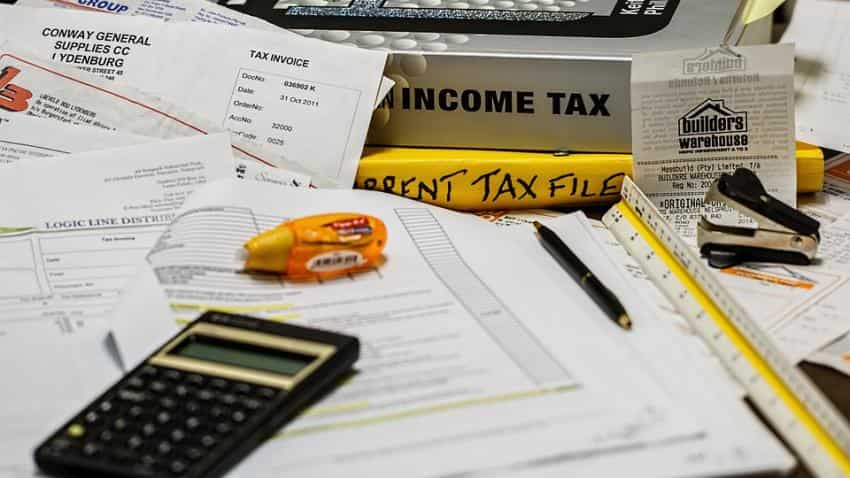
With the end of the financial year, the process to file tax return has been started. The salaried class people must have already started the process by downloading the necessary forms from the official income tax department website.
Amid the process, the government and Supreme Court is still battling with making Aadhaar card mandatory to file income tax return.
On March 21, the government had announced that it has made Aadhaar card mandatory to file ITR and applying for permanent account number (PAN). PAN number is mandatory to file income tax returns.
The deadline to do this is June 30, 2017. The rules also state that the name on PAN card and Aadhaar must match. But, last week the apex court questioned the Centre's move.
ALSO READ: Unable to link Aadhaar and PAN? Here's how you can do it in two steps
So, even if Aadhaar becomes necessary, depending on Court's decision, you have to take care about two forms: Form 16 and Form 26AS.
What is Form 16?
According to Cleartax, Income Tax Form 16 is a certificate from your employer. It certifies that TDS has been deducted on your salary by the employer. If an employer deducts TDS on salary, he must issue income tax Form 16 as per tax rules of India.
Form no 16 is issued once in a year, on or before 31st May of the next year immediately following the financial year in which tax is deducted.
It contain most of the information you need to prepare your income tax return in India. Form 16 has two parts Part A and Part B.
Form 16 Part A has
- Name and address of the employer
- TAN & PAN of employer
- PAN of the employee
- Summary of tax deducted & deposited quarterly, which is certified by the employer
- Assessment Year
- Period of employment with the employer
- Form 16 Part A must be generated and downloaded through Traces portal
- Part A of the Form 16 also has a unique TDS Certificate Number.
Details required:
- TDS Deducted by Employer
- TAN of Employer
- PAN of Employer
- Name and Address of Employer
- Current Assessment Year
- Your (Taxpayer’s) Name and Address
- Your PAN
Form 16 Part B has
- Detailed breakup of salary paid
- Deductions allowed under the income tax act (under chapter VIA)
- Relief under section 89
- If you have held more than one job during the year, you’ll have more than one Form 16.
- Part B is prepared by the employer manually and issued along with Part A.
Details required
- Taxable Salary
- Breakup of Section 80C Deductions
- Aggregate of Section 80C Deductions(Gross & Deductible Amount)
- TDS (Tax Deducted at Source)
- Tax Payable or Refund Due
What is Form 26AS?
Your Tax Credit Statement / Form 26-AS is an important document for tax filing. Instead of manually downloading your Form-26AS for filing your I-T Returns, you can directly import your 26AS information while filing your Income Tax Returns.
The form can be downloaded from TRACES (TDS Reconciliation Analysis and Correction Enabling System) which is part of Income Tax Department. It is linked with your PAN. You can view the form from FY09 onwards.
ALSO READ: Income Tax Filing: What is Sahaj? Here's all you need to know about new ITR-1 Form
As per Cleartax, you can downliad and view Form 26AS through the TRACES website in eight simple steps:
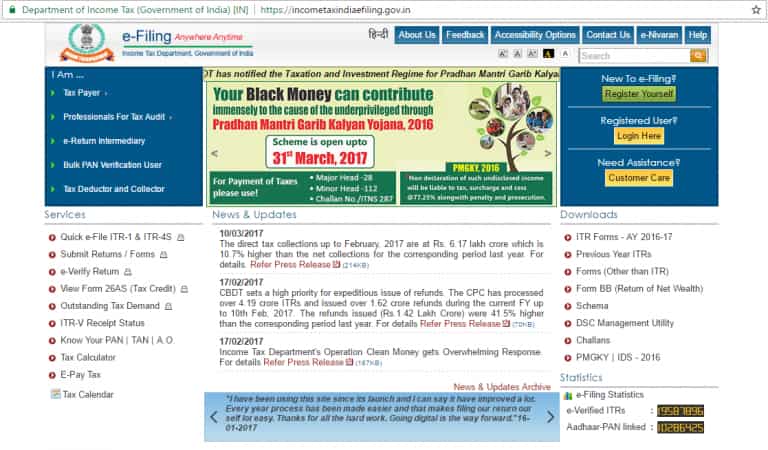
1. Go to https://incometaxindiaefiling.gov.in and Login using your income tax department login & password. If you don’t have an account, you’ll need to Register first (see the button on top of LOGIN).
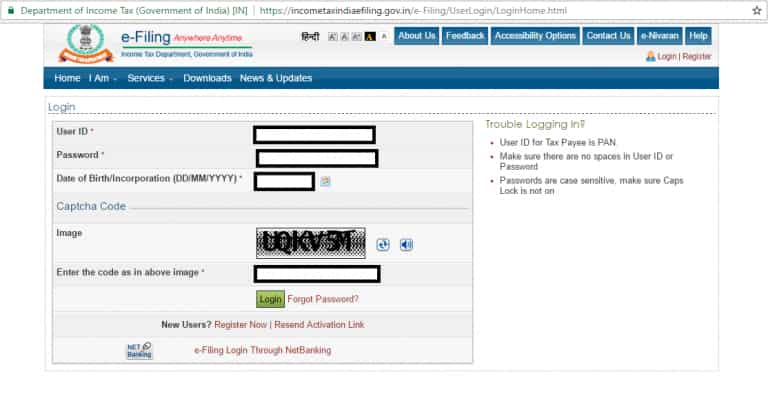
2. Enter your PAN number, password and date of birth / date of incorporation in DD/MM/YYYY format. And enter the captcha code. Now click on LOGIN.
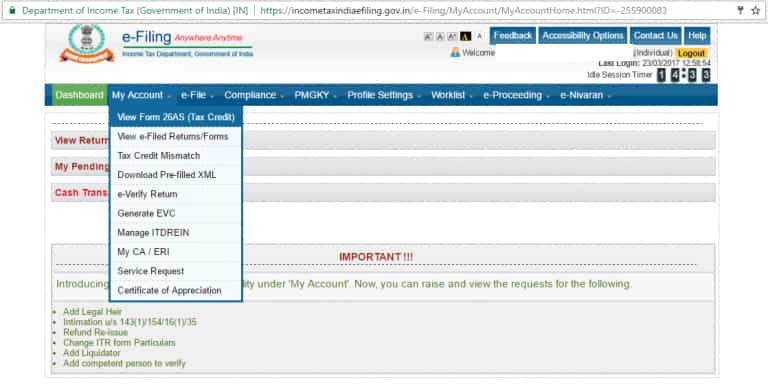
3. The following screen will appear. Go to ‘My Account’. Click on ‘View Form 26AS’ in the drop down
4. Click on ‘Confirm’ so that you are redirected to the TRACES website. (Don’t worry, this is a necessary step and is completely safe since it is a government website).
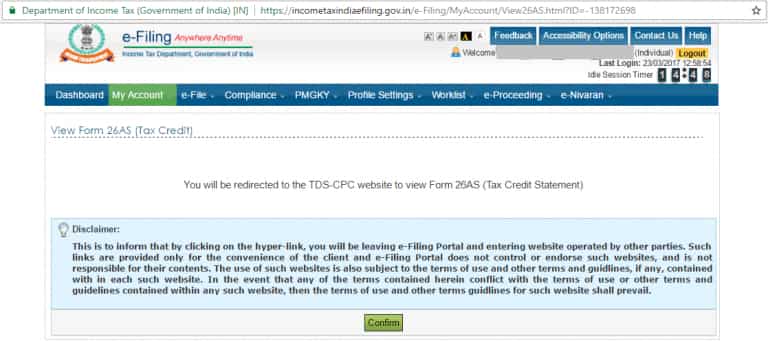
5. You are now on the TRACES (TDS-CPC) website. Select the box on the screen and click on ‘Proceed’.
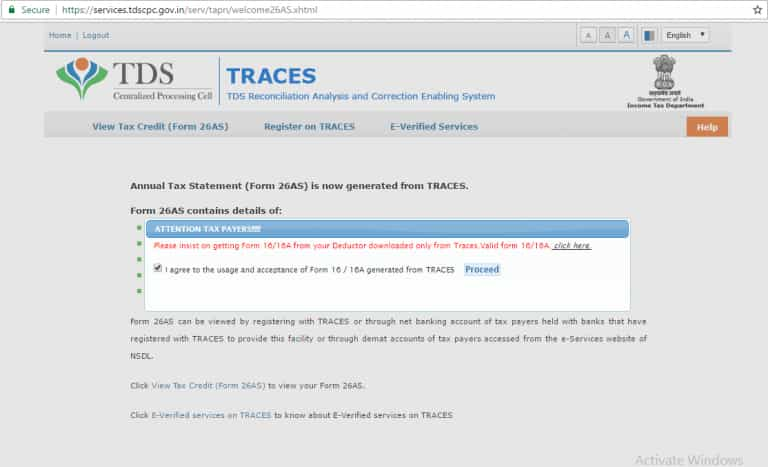
6. Click on the link at the bottom of the page – ‘Click View Tax Credit (Form 26AS) to view your Form 26AS’.
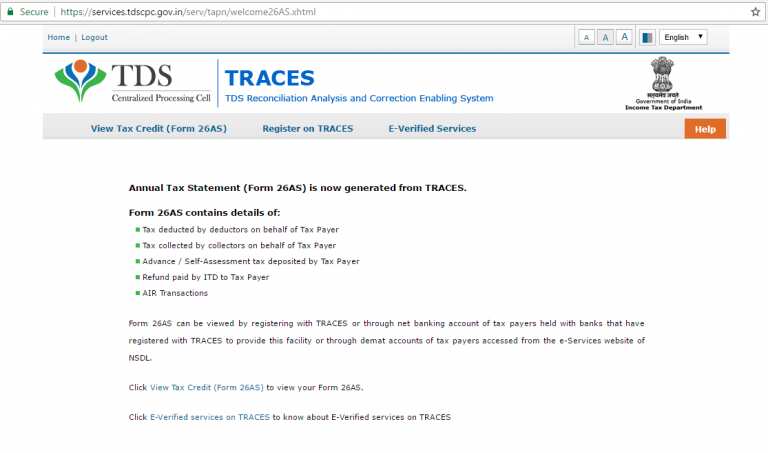
7. Choose the Assessment Year and the format in which you want to see the Form 26-AS. If you want to see it online, leave the format as HTML. If you would like to download a PDF for future reference, choose PDF. After you have made your choice, enter the ‘Verification Code’ and click on ‘View/Download’.
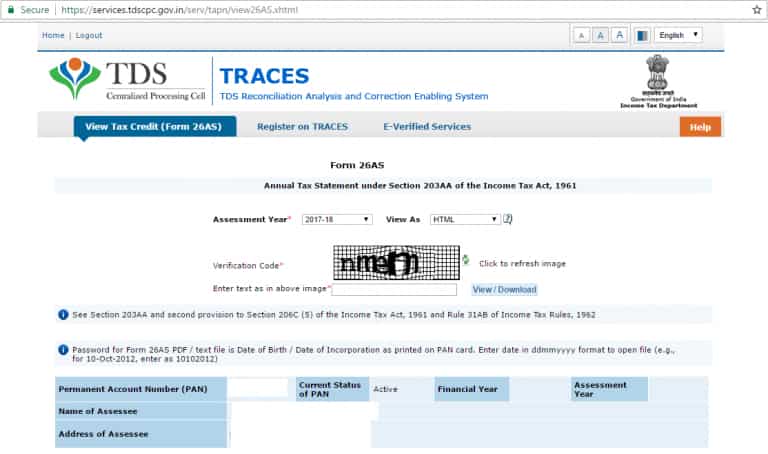
8. To open the document you have to enter a password. Form 26AS password is your DOB in DDMMYYY format. Voila! Your Income Tax Form 26AS will be shown!
So, do not wait for the last day, file the income tax today!
02:57 PM IST
 Income Tax: Why did some taxpayers receive notice for discrepancy in house rent receipt? IT Dept explains
 Advance Tax Filing Last Date: What will happen if you miss advance tax deadline?
  Record 8.18 cr ITRs filed for AY 2023-24 till Dec 31: Income Tax Dept
  Record number of over 7.85 crore Income Tax Returns filed till October 31 this year
 ITR: Still waiting for income tax refund? These could be the possible reasons